

The Definitive Step By Step Guide To Creating Lead Magnets Cover 3D

Generate Unlimited Leads for Your Business with This Free Step-by-Step Guide!

‘The Definitive Guide to Creating High-Converting Lead Magnets’ and start attracting qualified leads today!

Not sure where to start with ChatGPT or not getting the result you want?

Learn how to use ChatGPT to create leads, clients, and sales and run your business on autopilot! AI for Small Business: The Hands-On System to Turn ChatGPT into Your Ultimate Business Partner.

Cloudways Elastic Email DNS Records

Elastic Email Addon DNS Records

Elastic Email is a simple and fast email delivery service for high volume transactional emails.

Transactional emails are the type of automated emails that are triggered by user actions on a website, and can include things like:

  • shipping confirmation
  • password reset link
  • notifications
  • WordPress updates.

These are sent in bulk from your WordPress website to a third party destination (e.g. your customers, users, subscribers, members, etc.).

The external SMTP service like Elastic Email maximises the deliverability of emails and are often more reliable than the emails sent directly from your Cloudways server.

Firstly, the Elastic Email service needs to be added, configured and on the Cloudways server.

Then, the DNS records added to the domain.

Elastic Email Addon DNS Records

To ensure email deliverability when using the Cloudways Elastic Email Addon, the following DNS records need to be added to your domain to ensure deliverability, and minimise the chance that emails get flagged as spam or junk.

Go to the domains Registrar or DNS hosting service and update the records as follows:

CNAME Record

Type: CNAME
Host/Name: tracking
Value: api.elasticemail.com

TXT Records

Type: TXT
Host/Name: api._domainkey
Value: k=rsa;t=s;p=MIGfMA0GCSqGSIb3DQEBAQUAA4GNADCBiQKBgQCbmGbQMzYeMvxwtNQoXN0waGYaciuKx8mtMh5czguT4EZlJXuCt6V+l56mmt3t68FEX5JJ0q4ijG71BGoFRkl87uJi7LrQt1ZZmZCvrEII0YO4mp8sDLXC8g1aUAoi8TJgxq2MJqCaMyj5kAm3Fdy2tzftPCV/lbdiJqmBnWKjtwIDAQAB

Type: TXT
Host/Name
: @
Value: v=spf1 ip4:xx.xx.xx.xx +a +mx include:_spf.google.com include:_spf.elasticemail.com ~all

Type: TXT
Host/Name: _dmarc
Value: v=DMARC1;p=none;pct=100;aspf=r;adkim=r;

Notes:
  • xx.xx.xx.xx is the IP Address of the server your website is hosted on.
  • include:_spf.google.com when using Google Workspace Email

MX Records

MX Records When Using Google Workspace Email

Type: MX
Host/Name: @
Value: aspmx.l.google.com
Priority: 1
TTL: Auto/14400

Type: MX
Host/Name: @
Value: alt.aspmx.l.google.com
Priority: 5
TTL: Auto/14400
Type: MX

Host/Name: @
Value: alt2.aspmx.l.google.com
Priority: 5
TTL: Auto/14400

Type: MX
Host/Name: @
Value: alt3.aspmx.l.google.com
Priority: 10
TTL: Auto/14400

Type: MX
Host/Name: @
Value: alt4.aspmx.l.google.com
Priority: 10
TTL: Auto/14400

Post SMTP Configuration Cloudways Elastic Email
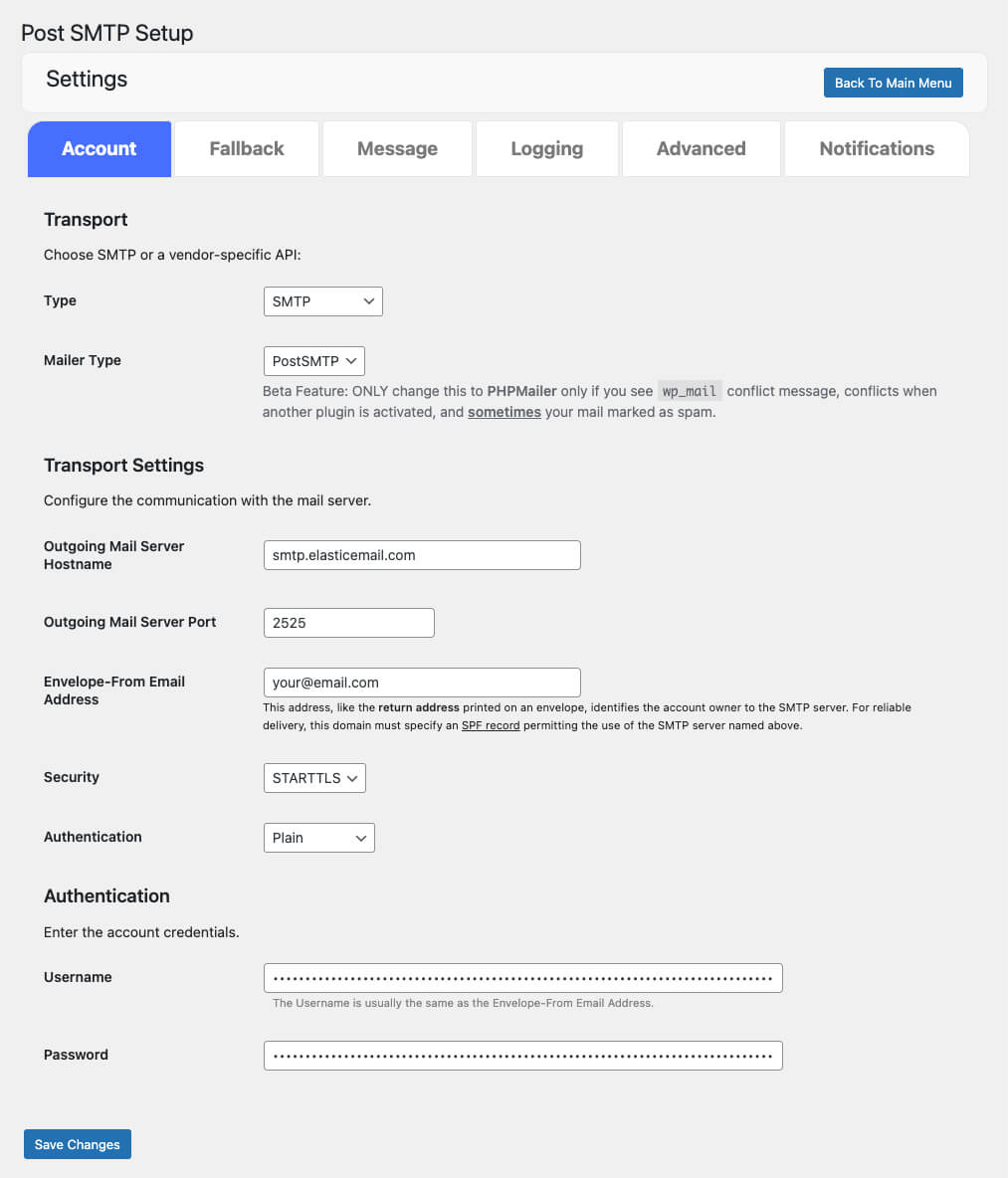
Type: SMTP
Mailer Type: PostSMTP
Outgoing Mail Server Hostname: smtp.elasticemail.com
Outgoing Mail Server Port: 2525
Envelope-From Email Address: [email protected]
Security: STARTTLS
Authentication: Plain
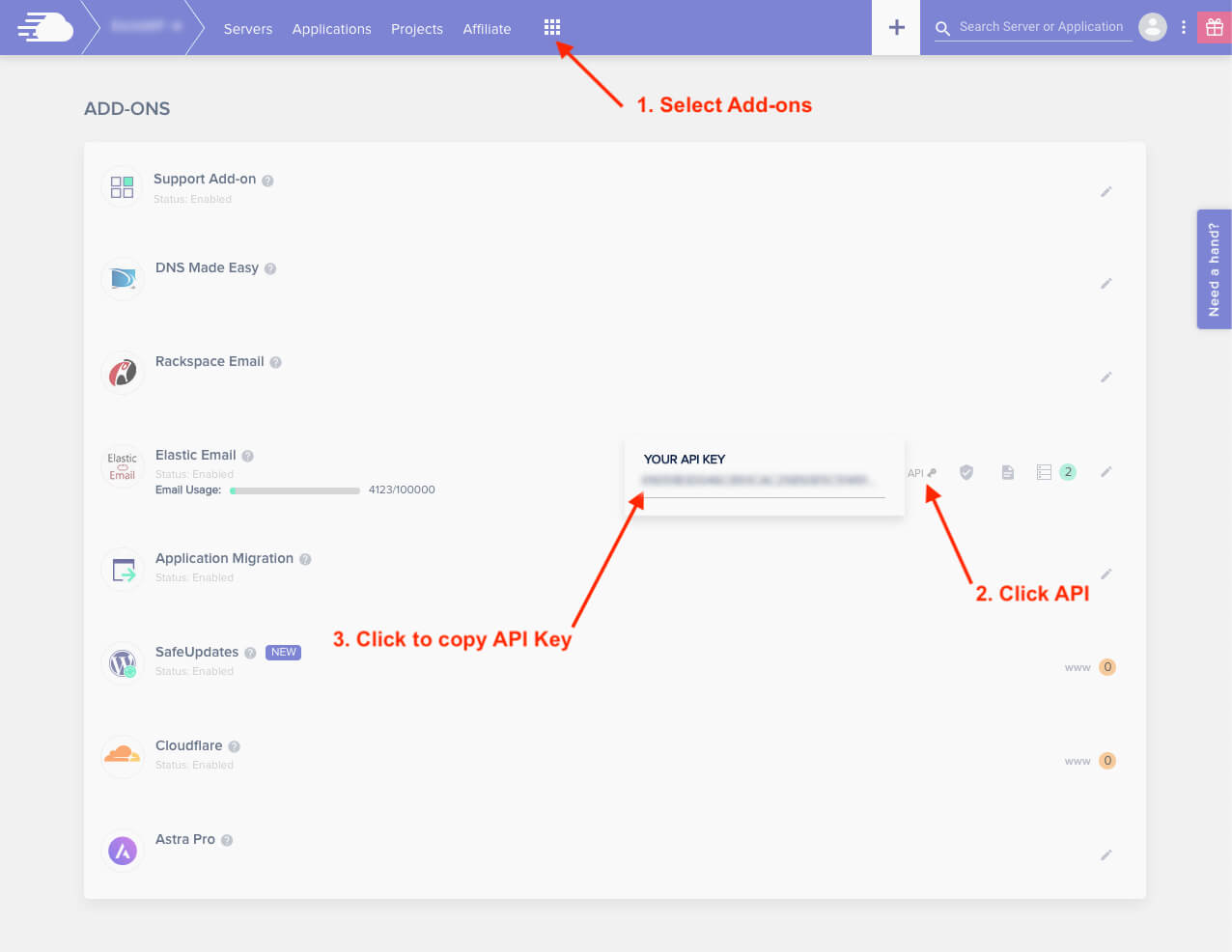
Username: [Elastic Mail Addon API Key]
Password: [Elastic Mail Addon API Key]

(See image below for the API Key Access)
AI for Small Business: The Hands-On System to Turn ChatGPT into Your Ultimate Business Partner

Not sure where to start with ChatGPT or not getting the result you want?
Learn how to use AI to create leads, clients, and sales and run your business on autopilot!

INTRODUCING ChatGPT Unlocked: The Business Owner’s Guide to AI – The Definitive Entrepreneurs Introduction & Practical Blueprint to AI using ChatGPT.

Picture of Nik Cree

Nik Cree

An entrepreneurial guide dedicated to helping small business owners and solopreneurs smash through barriers and achieve their full potential.

With over 13 years of experience building digital tools and strategies, Nik's passion lies in creating actionable solutions that make business easier, more efficient, and ultimately more successful.

Oh, and did we mention he's also the host of the weekly 'Business Owners Smashing It Online' webinar? Yep, every week, Nik dishes out insights, tools, and a healthy dose of inspiration for anyone eager to kick their 9-to-5 to the curb and thrive in the digital space.

Nik is a mentor, strategist, and community builder who believes in practical, step-by-step guidance—no fluff, just real, doable actions that get you moving.

Whether it’s through webinars, ebooks, or one-on-one coaching, Nik brings a personal touch to every interaction, and let’s be honest, probably a few dad jokes too.

He makes complex ideas simple and—dare we say it—actually kind of fun.

His mission?

To turn your big dreams into action, and help you create a business that gives you freedom, fulfilment, and maybe even a bit more time to enjoy your morning coffee.

Join Nik on this journey and learn how to build, grow, and smash it online, one actionable step at a time. Who knows, you might even enjoy the ride.

📞 Ready to take action? Book a call to discuss your strategy and next steps!

SmashGo
The Definitive Step By Step Guide To Creating Lead Magnets Cover 3D
Essential for every business ...

Generate Unlimited Leads for Your Business with This Free Step-by-Step Guide!

Download your free copy of ‘The Definitive Guide to Creating High-Converting Lead Magnets’ and start attracting qualified leads today!